Block editor ↗
Type like you would in a doc. Press / on a new line to add a review, a poll or a button.
Make emails that look good, let readers tap and answer, let your words do the talking, and turn each conversation into your next opportunity.

Hello again, Alex 👋
Your customers keep finding reasons to return.
BUILT TO SIT ALONGSIDE THE TOOLS YOU ALREADY USE



DashStash Studio is a clean, block-based editor for anything you want to share. Write newsletters, messages, landing pages and more, all in one calm place.
A good candle has one simple job, which is to make a room feel like yours again. Here are the ones we are pouring this week.


Make some tea. Light the wick. Stay awhile.


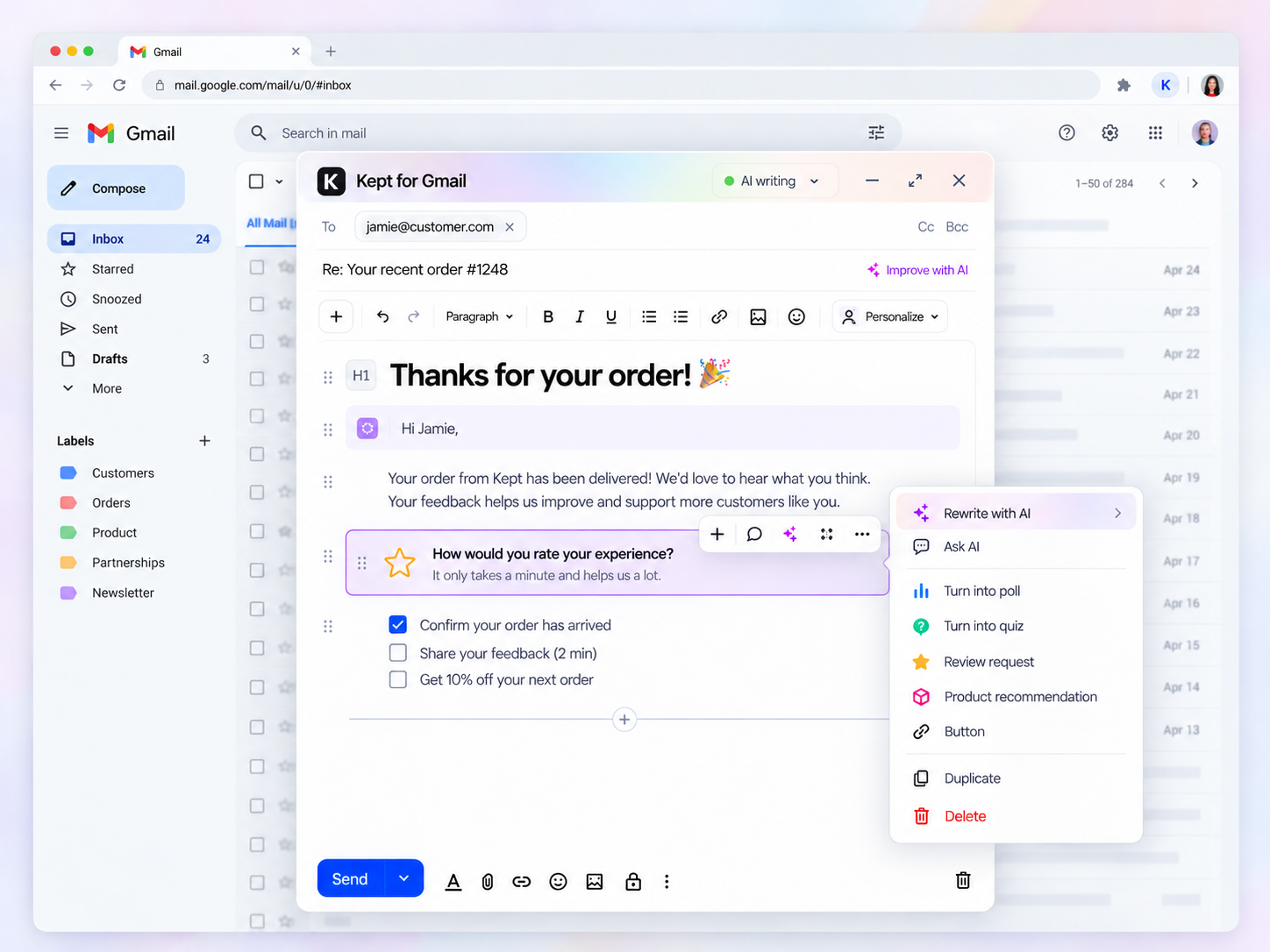
Keep working in Gmail the way you like. DashStash adds BlockNote-style editing and handy content actions right inside compose, and it never takes over your screen.
Meet DashStash Blocks: small, good-looking pieces that turn passive readers into customers who take a real step.
Type like you would in a doc. Press / on a new line to add a review, a poll or a button.
Choose a day and an hour. DashStash sends once you approve it.
Preview your email in Gmail on a phone, then approve it when it looks right.
Pick a ready-made look for your emails and pages, then change the colors and fonts until it feels like you.
Each campaign lives on its own page that is simple to share and simple to find.
Add subscribers from a form on your site or directly from code.
Track opens, clicks and the growth of your list.
Move your list in from your old email tool. It takes about a minute.
 Mailchimp
 MailerLite
 Substack
 beehiiv
Already built in and turned on, so your emails stand the best chance of landing in the inbox.
Use your own address to send, not just a shared one.
Email tools charge more as your list gets bigger. See how the monthly bill changes with your audience size, and find a better way to turn contacts into customers.
Pick your list size to see how the monthly bill moves with it.
Send each customer something they want to open.
Offer the next product or service, guided by what they bought before.
Lead customers straight from interest to purchase.
Three ordinary moments where DashStash makes your job simpler.
“It has been a while since your last order. Shall we set up your usual again?”
“You enjoyed your last pick. Here is something that goes nicely with it.”
“You keep coming back and we notice. Here is a small thank-you.”
These are sample campaign messages, not real customer reviews.
We're building early access for businesses that want a better way to stay close to their customers.
Get a first look at AI-powered customer retention made for businesses where personal service counts.
No. In one place, DashStash gives you a creative editor, Gmail tools, conversational pages, interactive blocks, customer insights and commerce features.
Yes. DashStash for Gmail adds BlockNote-style editing to the compose window. Actions appear when you select something, so there is no permanent sidebar in the way.
DashStash Pages gives visitors an AI-powered chat about the content you decide to publish. Answers should rest on your public material and point back to the original sources.
DashStash sends email-safe content and links to a web version for anything that needs more than email can do. How much works inside the inbox depends on the reader's email client.
No. You can write and publish everything by hand, and bring in AI only when it helps.
Put it together from blocks and view it on a phone. Pick your send time, then see who opened it. Bring your list over and send from your own domain.
Share a few details about your business. This demo form drafts an email for you to send. Your details are not saved on a server.
